
Keywords drive title generation. AI Content Generator’s SEO brief (titles) panel exposes two fields that together determine how many articles a single keyword produces: Main keywords (the seed list) and How many titles to generate (the per-batch volume). Used together, they let you scale from “one article per keyword” up to “twenty different angles per keyword” without changing anything else in the campaign.
This tutorial covers the two fields end-to-end: where they live, how Main keywords get turned into titles, the practical limits before the model starts repeating itself, the anti-duplicates options that prevent two near-identical posts going live, and the operational rules that produce 5–15 unique articles per keyword on demand.
By the end you’ll have a keyword-to-article workflow that turns each main keyword into a multi-article cluster, with deduplication guards that keep the output diverse and a clear ceiling beyond which adding more titles produces diminishing returns.
Where the controls live
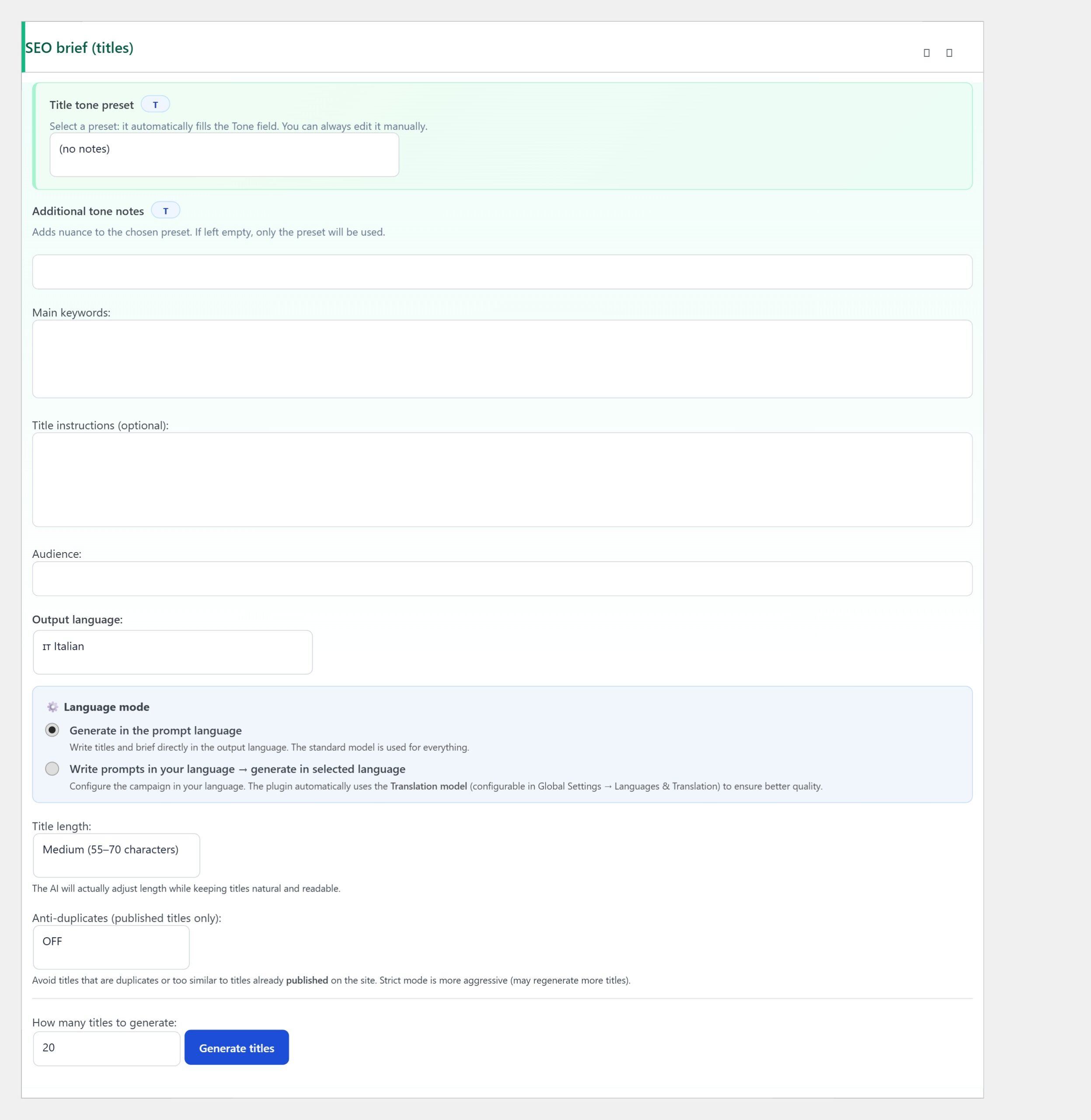
Open the campaign editor and find the SEO brief (titles) postbox. Inside it, the Main keywords textarea accepts one keyword per line (or comma-separated). Below it, the How many titles to generate field accepts an integer.
Step 1 — Write Main keywords precisely
The model treats every line as a seed for title generation. The more precise the seed, the more focused the output. Vague seeds (“AI”) produce drift; specific seeds (“Claude API key configuration in WordPress”) produce angles that stay on-topic.
Three rules. Keep keywords in the same topical cluster within a single campaign. Mixing “WordPress security” and “vegan recipes” in the same Main keywords list confuses the model. Use 2–5 word phrases, not single words. “Plugin” is too broad; “WordPress AI plugin setup” is targeted. Include long-tail variations. A list with both “Claude API key” and “How to create Claude API key” produces more title diversity than either alone.
Step 2 — Set How many titles to generate
This field is the per-batch volume. Set it to 5 and the campaign asks the AI to produce 5 titles from the Main keywords list each time you click Generate titles. Set it to 20 and you get 20.
The practical ceiling varies by keyword. A broad keyword like “WordPress security tutorial” supports 15–20 unique angles before the model starts repeating itself. A narrow keyword like “Claude API key configuration” supports 5–8 angles before the diminishing returns kick in. Start with 10 as a sensible default; raise or lower based on the quality of the first batch.
Step 3 — Enable Anti-duplicates
The Anti-duplicates dropdown right below has three options: OFF, ON (Fast) — recommended, and ON (Strict) — more strict. The Fast option compares each new title against the published-titles index using lightweight similarity scoring; Strict adds semantic comparison via embeddings, catching cases where the wording differs but the meaning is the same.
For most campaigns, Fast is the right default. Strict is useful when you have 200+ published posts and the simpler heuristic starts to miss synonyms. Both modes only check against already-published titles, so they don’t slow down generation noticeably.
Step 4 — Write Title instructions for shape
The Title instructions textarea below Main keywords lets you constrain the shape of the titles regardless of the keyword. Practical instructions: “Every title must start with ‘How to'”, “Include a year only on evergreen topics”, “Avoid clickbait phrases like ‘You won’t believe…'”. These instructions apply on top of the keyword list.
Use Title instructions to enforce campaign-wide voice rules. A “how-to tutorial” campaign should constrain titles to start with “How to”; a “comparison” campaign should constrain titles to a “X vs Y” structure; a “news brief” campaign should constrain titles to start with a verb. Keyword + instruction together produce sharper titles than either alone.
Step 5 — Generate, review, prune
Click Generate titles in the campaign editor. The plugin produces the configured number of titles, applies the anti-duplicates filter, and shows them in the Titles (generation & selection) panel below. Review them: tick the ones you’ll keep, untick the bad ones.
Typical hit rate on the first batch is 60–80% — meaning 6 to 8 of every 10 titles are usable, the rest are off-tone or off-topic. Don’t try to produce 100% usable titles; the prune step is fast and gives you editorial control.
Step 6 — Iterate with multiple batches
If the first batch produced 8 good titles and you wanted 20, click Generate titles again. The model produces another batch — already deduplicated against the first batch via Anti-duplicates. Repeat until you have the volume you wanted.
Each iteration costs a tiny fraction of a cent on most providers (title generation uses a few hundred tokens), so don’t try to maximise the first batch. Run several smaller batches with refined Title instructions between them.
Common patterns
- One keyword → 5 articles — a focused mini-cluster. Pick one keyword in Main keywords, set How many titles to 5–7, generate one batch, publish all five over a week.
- Three keywords → 15 articles — a balanced cluster covering related topics. Three keywords in Main keywords, How many titles 15, one batch produces 5 articles per keyword.
- Twenty keywords → 100 articles — a pillar-cluster campaign. Twenty keywords in Main keywords, How many titles 25, run four batches across a month, end up with ~20 articles per pillar.
When you hit the keyword ceiling
Every keyword has a natural ceiling — the number of genuinely different angles you can write about it. Past the ceiling the model starts producing variations of titles you’ve already published. Anti-duplicates catches most of them, but you’ll notice the rejection rate climbing.
The fix is not to push the same keyword harder — it’s to add more keywords. If “WordPress AI plugin” maxed out at 12 articles, add “WordPress AI plugin comparison”, “WordPress AI plugin pricing”, “WordPress AI plugin alternatives” — each adds another 5–10 articles before its own ceiling.
Troubleshooting
- Titles are too similar to each other — Anti-duplicates is off, or the keyword list is too narrow. Switch to Fast or Strict, add more keywords.
- Titles drift off-topic — Main keywords are too vague. Tighten them to 3–5 word phrases.
- How many titles requests are rejected — the provider hit a rate limit. Lower the batch size, wait a minute, retry.
- Same title generated twice in one batch — Anti-duplicates only filters against published titles, not against the current batch. Untick one manually.
- Hit rate dropped below 50% after a month — you’re past the keyword ceiling. Add more keywords or rotate the campaign to a new topical cluster.
You’re done
That’s the full keyword-to-article workflow: write precise Main keywords (2–5 word phrases, same topical cluster), set How many titles to generate (10 as a default), enable Anti-duplicates Fast, write Title instructions for shape, generate, prune, iterate.
From here every keyword in your list becomes a mini editorial cluster of 5–15 unique articles, deduplicated against your existing library, shaped by the campaign’s voice rules. Scaling to hundreds of articles per month is a matter of adding more keywords, not pushing the same keyword harder — which keeps the editorial quality high as the volume grows.