
The fastest way to fill an editorial backlog isn’t to brainstorm titles one at a time — it’s to import a curated list in bulk. AI Content Generator handles this through the Titles (generation & selection) postbox, which exposes a Manual titles textarea: paste any number of titles, one per line, click Add manual titles to the list, and the entire backlog becomes the campaign’s queue.
This tutorial covers the bulk import workflow end-to-end: where the Manual titles textarea lives, how to format the list for best results, how to combine manual titles with auto-generated ones, the anti-duplicates step that protects you from accidentally importing already-published titles, and the operational habits that turn a one-time backlog import into a steady editorial pipeline.
By the end you’ll have a campaign loaded with 30, 100 or 500 titles imported in bulk, deduplicated against the existing library, ready to be processed by the scheduling and AI provider settings you’ve already configured.
Where Manual titles lives
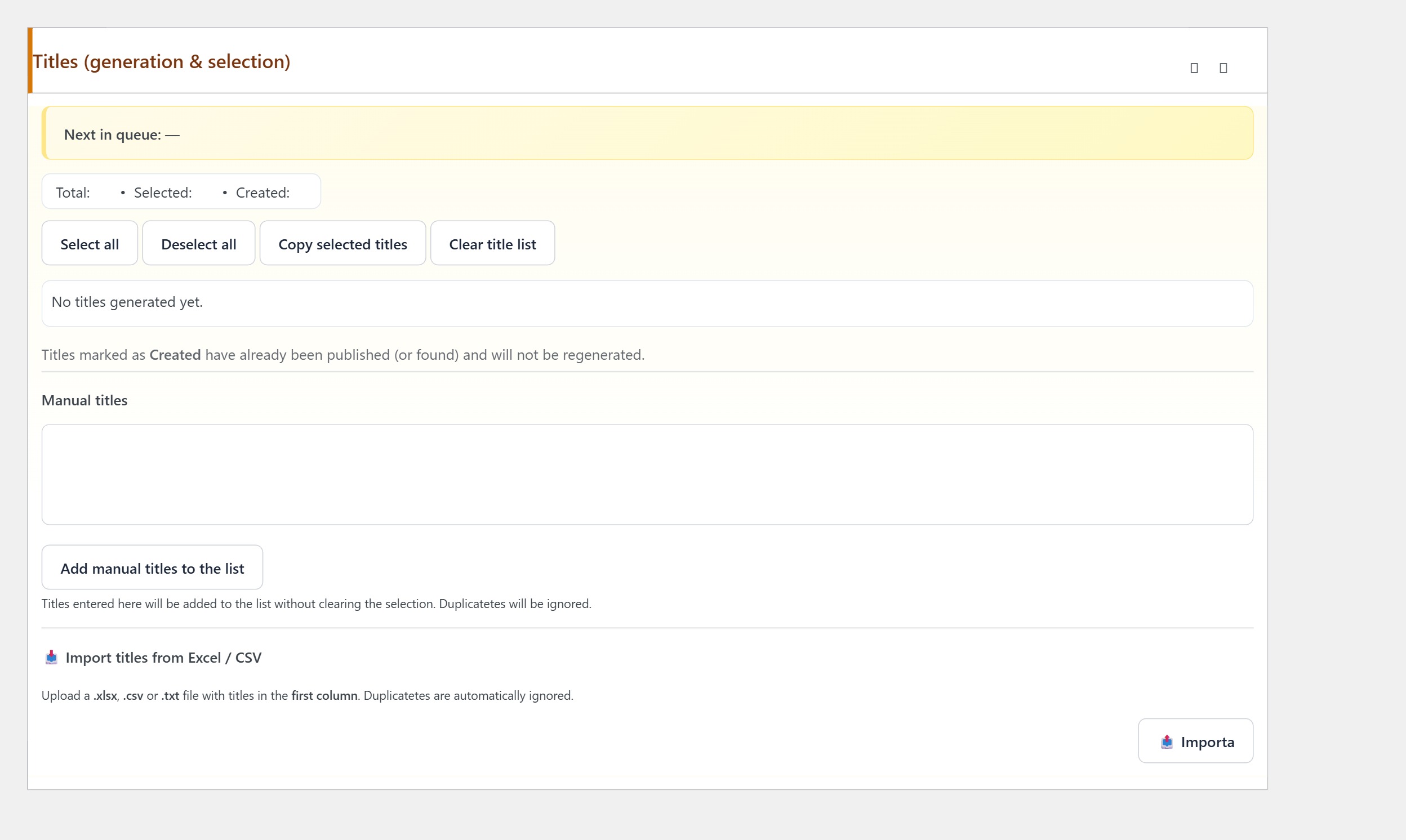
Inside the campaign editor, scroll to the Titles (generation & selection) postbox. Below the auto-generation controls there’s a Manual titles section with a large textarea and an “Add manual titles to the list” button.
Step 1 — Prepare the title list externally
Build the list in whatever tool you prefer — a spreadsheet, a markdown file, a Notion database. The format AI Content Generator expects is one title per line, plain text, no leading numbers or bullets.
Three rules for the list:
- Keep titles in the same topical cluster. Mixing “WordPress security” titles with “vegan recipes” titles in one campaign confuses the model.
- Pre-deduplicate. Remove near-identical titles before importing; the plugin’s Anti-duplicates filter catches some, but a clean input produces a cleaner queue.
- Use the final form. The plugin uses the title verbatim unless the SEO brief (titles) panel rewrites it. Polish each title before importing rather than relying on the AI to fix typos.
Step 2 — Paste into the Manual titles textarea
Copy the entire list (Ctrl+A in your spreadsheet column, Ctrl+C). Paste into the Manual titles textarea. The textarea handles long lists fine — 500+ titles work without trouble. Each line becomes one queue entry.
Before clicking the button, glance at the textarea: any title that wraps onto two lines indicates an embedded newline that will split it into two entries. Either fix the source or use a regex find/replace to strip them (“\n(?=[a-z])” matches newlines followed by lowercase, which usually indicates wrap rather than separator).
Step 3 — Click “Add manual titles to the list”
Click the button below the textarea. AI Content Generator parses every line, applies the Anti-duplicates filter (if enabled in SEO brief (titles)) against your published-titles index, and adds the surviving titles to the campaign queue.
The Total / Selected / Created counters at the top of the panel update with the new state. If you imported 100 titles and the Total now shows 87, that means 13 were rejected as duplicates of previously-published content — a sign the filter is doing its job.
Step 4 — Review and prune the queue
The Titles panel shows you every title in the queue with checkboxes. Untick the ones you don’t want to publish right now — they stay in the campaign but won’t be picked up by the scheduler. Tick the ones you want next. The Selected counter reflects how many will run.
For a 100-title bulk import, a typical workflow is: paste all 100, tick the 20 you want this week, let the campaign chew through them on the scheduling cadence, come back next week and tick another 20. The Manual titles textarea is the input; the checkboxes are the editorial gate.
Step 5 — Combine manual with auto-generated titles
The Manual titles flow doesn’t replace the auto-generation flow — they coexist. A common pattern: import 50 manual titles for the cornerstone topics you want to control, then let the auto-generator (Main keywords + How many titles to generate) produce 50 more from the same SEO brief.
The campaign queue ends up with 100 titles, half human-curated and half AI-suggested. Both pools share the same dedup filter, so the AI never re-proposes a manual title you already added.
Pattern — turn a sitemap or external list into a backlog
A practical use case: you find a competitor whose content you want to cover from a different angle. Export their sitemap URLs, extract the post titles, paste them into Manual titles — you now have a queue covering the same topic space they do. AI Content Generator produces your version of each.
This isn’t plagiarism: you’re importing only the titles (which are topical signals), and your campaign’s voice + SEO brief + Extra AI instructions guarantee the resulting articles are genuinely yours. Use it as a backlog seeder, not a copy machine.
Pattern — refresh old content via Manual titles
Another use case: refreshing old posts. Export the URLs of your 50 oldest articles, extract the titles, edit them slightly (e.g. add “2026 update”), paste as Manual titles. The campaign produces fresh versions which you publish as new posts, then redirect the old URLs.
Anti-duplicates needs to be off for this specific pattern (the new titles ARE duplicates of the old ones by design). Disable it temporarily, import, then re-enable Anti-duplicates for the regular operation.
Troubleshooting
- Most pasted titles are rejected as duplicates — your published-titles index is large and overlap is real. Verify by checking 5 of the rejected titles against your existing posts; if they’re genuinely duplicates, this is correct behaviour.
- Pasted titles split into multiple entries unexpectedly — embedded newlines in the source data. Pre-process the list.
- Total counter doesn’t update after clicking Add — the page hit an error. Open the browser console for details; usually a nonce expiry — refresh the page and re-paste.
- Imported titles never get processed — the campaign is paused or the Selected counter is zero. Tick the checkboxes and confirm the campaign is active.
- Manual titles override SEO brief (titles) settings — by design. The brief shapes auto-generated titles; manual titles are used as-is.
You’re done
That’s the full bulk-import workflow: prepare a clean list externally, paste into the Manual titles textarea, click Add manual titles to the list, review the Total / Selected counters, prune the queue via checkboxes, combine with auto-generated titles if you want, run the campaign on the cadence configured in Base data.
From here a one-time bulk import becomes a long-running editorial backlog — the campaign chews through the queue on the scheduling cadence you set, producing fresh articles from each title with the SEO brief, tone preset and Extra AI instructions you configured. Replenishing the queue takes minutes; the publishing happens automatically.