

AI Content Generator supports two language modes for every campaign: Generate in the prompt language (write the brief in language X and produce output in language X), or Write prompts in your language → generate in selected language (write the brief in your working language, produce output in a different target language). The second mode is what makes multilingual publishing efficient — you can maintain briefs, notes and instructions in one language while producing articles in five.
When you enable that translate-from-base mode, a new dropdown appears: Translation model. This tutorial explains what that dropdown does, why the recommended default is GPT-4.1 Mini, when to override to a heavier model, how the setting interacts with your global default AI provider, and the cost implications of picking one model over another.
By the end you’ll have the Translation model picked deliberately per campaign, matching the language target and quality budget, with the awareness of what changes if you upgrade or downgrade the model.
Where the Translation model lives
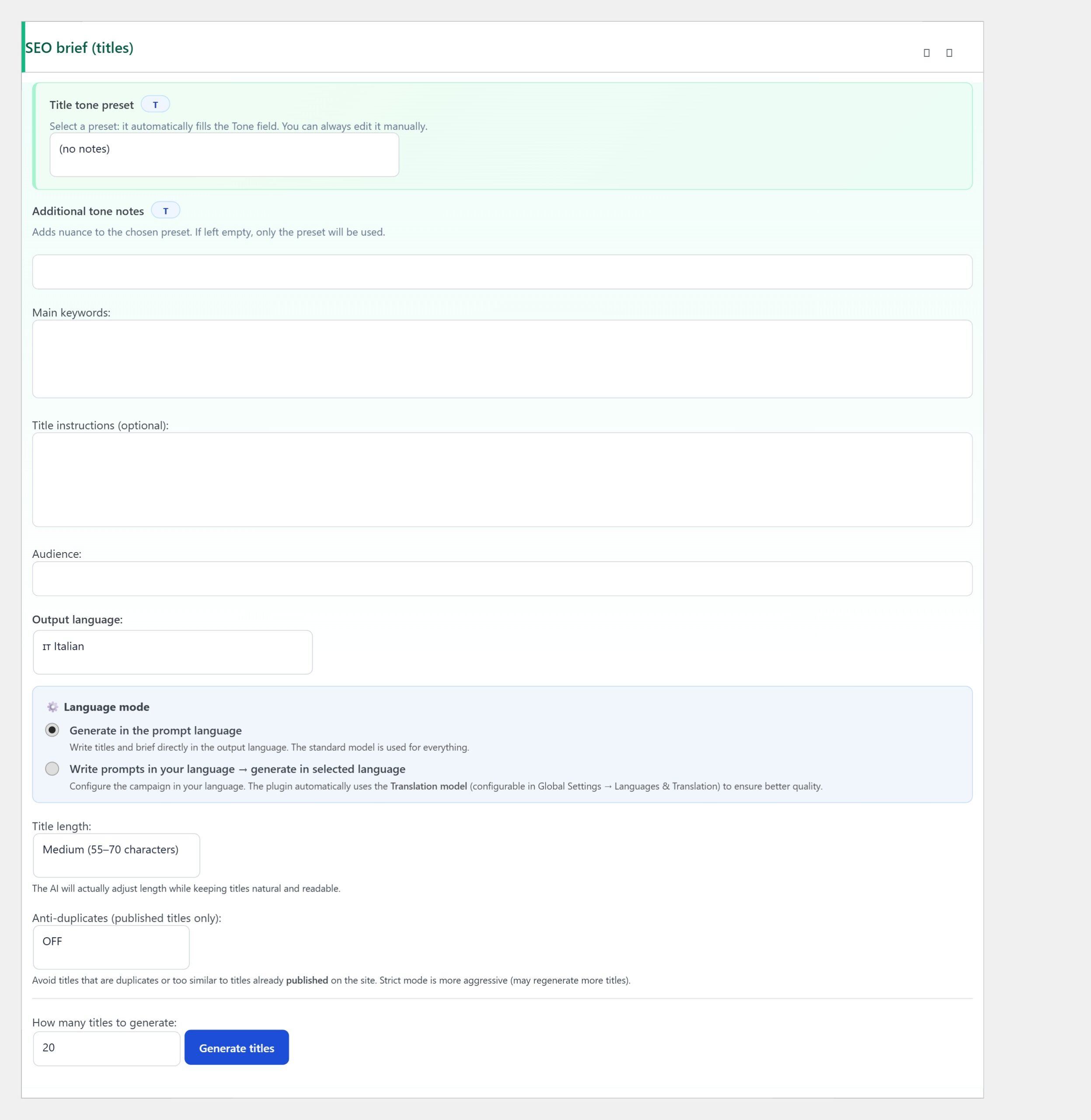
Inside any campaign editor, open the SEO brief (titles) metabox. Below the Main keywords, Title instructions, Audience and Output language fields, the Language mode section has two radio options. Pick “Write prompts in your language → generate in selected language” and the Translation model dropdown appears below with a default of GPT-4.1 Mini.
What the Translation model actually does
When Language mode is set to Translate, AI Content Generator runs a two-step pipeline for every article. Step 1: the campaign’s main AI provider (OpenAI / Claude / Gemini as configured in AI Provider) generates the article in your prompt language. Step 2: the Translation model translates the article into the target Output language.
The main AI provider handles the writing (structure, tone, argument). The Translation model handles the language transfer. Splitting the two lets you use a powerful writer (Claude Sonnet 4) with a cheap-but-competent translator (GPT-4.1 Mini) — good quality, controlled cost.
Step 1 — Why GPT-4.1 Mini is the recommended default
GPT-4.1 Mini is the default because it’s the best-value multilingual translator on the market at time of writing. Three specific advantages.
- Multilingual quality is close to the full GPT-4 family. On the major European languages (English, French, German, Italian, Spanish, Portuguese) the translation quality is almost indistinguishable from GPT-4o.
- Cost is around 15% of GPT-4o. A 1500-word article translation costs roughly $0.02 on Mini vs $0.15 on 4o.
- Latency is 2–3× faster. Important for high-volume publishing where the total generation-plus-translation pipeline compounds.
Step 2 — When to override to a heavier model
Three scenarios where GPT-4.1 Mini is not enough and you should switch to GPT-4o, Claude Sonnet or Gemini Pro.
- Less common languages — Polish, Czech, Bulgarian, Romanian, Greek, Finnish, Hungarian. Mini’s training on these is thinner; heavier models handle idiomatic nuance better.
- Asian languages — Japanese, Korean, Chinese. All three have politeness-register systems that require careful handling. Claude Sonnet handles them noticeably better than any Mini variant.
- Technical or legal content — where a mistranslated term changes meaning materially. Upgrade to preserve accuracy.
Step 3 — Match the Translation model to the target audience
Different models translate with different registers by default. GPT-4.1 Mini tends toward neutral formal — safe for most editorial content. Claude Sonnet leans slightly formal — right for professional or B2B audiences. Gemini Pro is the most literary in its output — best for content where the translated version needs to read like it was originally written in the target language, not translated.
For blog content the differences are small; for high-stakes multilingual publishing (documentation, marketing pages, legal notices) they matter. Test with one article in each candidate model before committing the campaign.
Step 4 — The Translation model is independent from AI Provider
An important subtlety: the Translation model dropdown lists all configured providers (OpenAI, Claude, Gemini) regardless of which one you picked in the AI Provider metabox. You can write with Claude and translate with GPT-4.1 Mini in the same campaign.
The two settings are independent by design. That’s how you get the “best writer + cheap translator” combination — pick a heavy provider for the AI Provider metabox and a lightweight variant for the Translation model. Both need to be configured in Settings for the option to appear in the dropdown; if Claude isn’t set up, it won’t be selectable.
Step 5 — Cost math for multilingual campaigns
For a campaign publishing 30 articles/month in Translate mode at 1500 words each, the cost breakdown looks like this (rough estimates, models change prices):
- Main provider Claude Sonnet 4 — 30 × $0.06 = ~$1.80 for the writing step.
- Translation GPT-4.1 Mini — 30 × $0.02 = ~$0.60 for the translation step.
- Total per month: ~$2.40 per language.
For 4 languages: ~$9.60/month. Upgrade the translator to GPT-4o and the total rises to ~$15/month. The 60% cost bump for translator upgrade is small in absolute terms but adds up quickly across many campaigns and many languages.
Step 6 — Handle slug translation
The Translation model also handles the WordPress slug — the URL-friendly version of the title. Different models produce different slugs from the same title. GPT-4.1 Mini tends to transliterate names conservatively; Gemini Pro is more aggressive with pure-target-language slugs.
For SEO in the target language, the fully-target-language slug is what you want. If the Mini variant is producing English-transliterated slugs in your Italian campaign (“how-to-configure-gemini” instead of “come-configurare-gemini”), add an explicit instruction in Extra AI instructions: “The slug must be in the target language, never transliterate English keywords”.
Troubleshooting
- Translation model dropdown doesn’t appear — Language mode is set to “Generate in the prompt language”. Switch to the Translate option.
- Translated output feels stiff — Mini is defaulting to formal register. Add “Use natural conversational tone in the target language” to Extra AI instructions.
- Idioms translate literally — Mini isn’t strong enough on this pair. Upgrade to GPT-4o or Claude Sonnet.
- Cost spike after enabling Translate mode — the pipeline runs twice (write + translate). Halve your Articles per day to compensate, or downgrade the main provider.
- Slug is in English on non-English campaign — add the slug-in-target-language instruction to Extra AI instructions.
You’re done
That’s the Translation model dropdown: default GPT-4.1 Mini for European languages and general blog content, upgrade to Claude Sonnet or Gemini Pro for Asian languages or high-stakes technical content, independent from the AI Provider metabox so you can combine a heavy writer with a lightweight translator.
From here every article in a Translate-mode campaign goes through the two-step pipeline: main provider writes, translation model translates, WordPress publishes. The setting is invisible from then on — configure once, forget forever.