
The meta description is the single block of text that decides whether a Google search result gets clicked. WordPress ships with no native meta description field — that’s why almost every site adds Yoast SEO or Rank Math: both plugins expose a focus keyphrase, an SEO title and a meta description that override the default Open Graph tags. Writing them by hand for every post is a chore most blogs end up skipping, which leaves Google to invent its own snippet (often poorly). AI Content Generator can fill all three fields automatically, on every post, using the same AI provider that wrote the article itself.
This tutorial walks through the entire feature end-to-end: enabling the auto-generate meta SEO panel on a campaign, picking the target SEO plugin (Yoast or Rank Math, both auto-detected), choosing a description style, deciding how the focus keyword is derived, previewing the result before publishing, and the rules to know if you want every snippet to actually drive clicks instead of just “filling the field”.
By the end you’ll have a campaign that produces fully SEO-optimised drafts: a clean focus keyphrase, a punchy SEO title under 60 characters, a 140–155 character meta description, and (optionally) a JSON-LD article schema block — all attached to the post automatically, with zero post-edit clicks.
What Yoast and Rank Math actually need
Before touching the plugin, it helps to know what the two main WordPress SEO plugins want. Yoast SEO uses three primary fields per post: Focus keyphrase, SEO title and Meta description. The plugin scores each post against best practices (“does the focus keyphrase appear in the title?”, “is the meta description under 156 characters?”) and shows a green / orange / red traffic light. Rank Math uses the same three fields under slightly different names (it calls them Focus keyword, Title and Description) plus a richer set of scoring rules and a more aggressive AI-driven analysis.
Both plugins store their data in post meta keys: Yoast uses _yoast_wpseo_focuskw, _yoast_wpseo_title, _yoast_wpseo_metadesc; Rank Math uses rank_math_focus_keyword, rank_math_title, rank_math_description. AI Content Generator writes to the right keys based on which plugin it detects active on your site — no manual mapping required.
Step 1 — Open the campaign and enable Auto-generate meta SEO
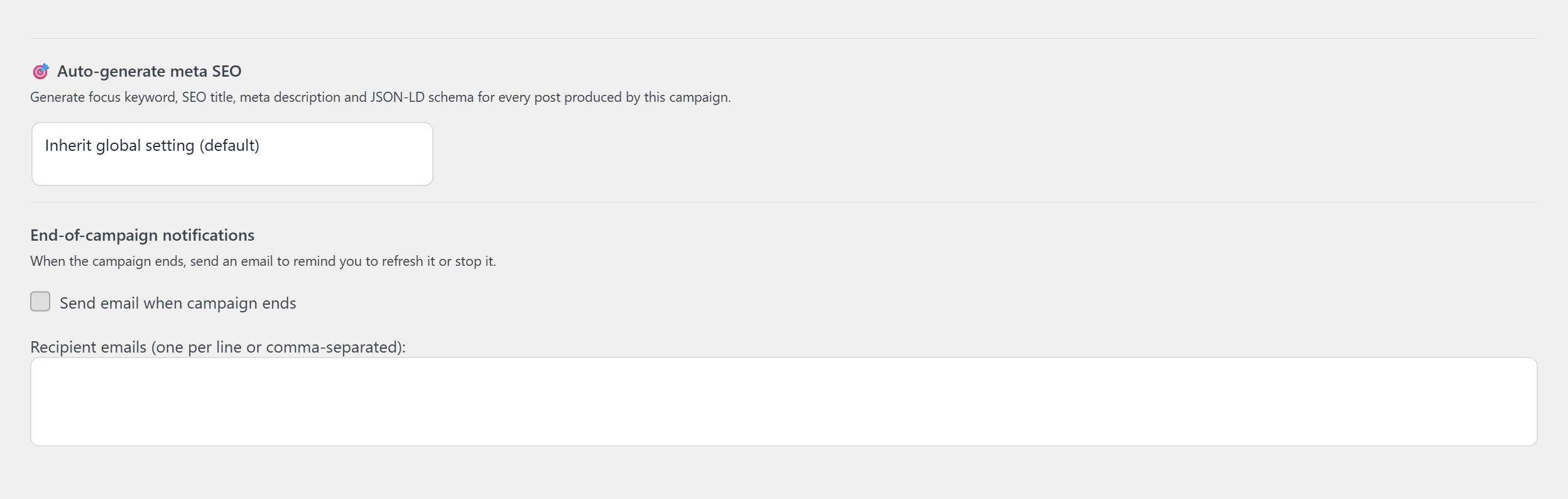
Inside a campaign editor, scroll until you find the panel titled Auto-generate meta SEO. By default it’s set to “Inherit global setting”; switch the dropdown to Generate & write to Yoast / Rank Math. The plugin auto-detects which SEO plugin is active (you’ll see “Yoast SEO (detected)” or “Rank Math (detected)” right next to the toggle).
Step 2 — Choose the description style
The Meta description style dropdown offers four presets: Conversion-oriented (140–155 chars), Informational (130–150), News-style hook (110–130), Free-form (model decides). The recommendation is to stay on Conversion-oriented for evergreen blog content: 140–155 characters is the sweet spot Google rarely truncates, and “conversion-oriented” steers the model toward a benefit-led sentence with a soft CTA at the end.
For news-style content you can switch to News-style hook: shorter descriptions perform better on Google News surfaces and on social previews where short blocks of text are favoured. Free-form is mostly useful when you want to A/B test description lengths — leave it for experiments, not for everyday publishing.
Step 3 — Decide where the focus keyword comes from
The Focus keyword dropdown has three options:
- Inherit from title — the model extracts the keyphrase directly from the article title. Fast, predictable, works very well when titles are SEO-aware to begin with.
- Inherit from main keywords — uses the keyword you typed in the SEO brief (titles) panel as focus. Best when one campaign targets one tight cluster of keywords.
- Let the AI decide — the model reads the full article and picks the keyphrase it thinks fits best. Use this only when you trust the model not to drift; otherwise stick with one of the deterministic options.
A common, very reliable configuration: titles are written keyword-first (“How to do X” where X is the keyphrase), and focus keyword is set to Inherit from title. That way every article ends up with the focus keyphrase living exactly inside its H1, which is half of the Yoast / Rank Math scoring criteria already satisfied.
Step 4 — Check the SEO title length
The SEO title (the one written to _yoast_wpseo_title / rank_math_title) doesn’t have to match the post H1 — and very often shouldn’t. AI Content Generator generates a shorter, more search-engine-friendly variation by default, capped at 60 characters. You can configure the cap in the panel: 60 is the safe default, 55 is even safer if your theme adds the brand name automatically at the end.
If your titles already work as SEO titles, you can switch to “Use the post title verbatim”. The plugin will copy it as-is, skip the trimming, and just truncate at the configured cap. The Yoast / Rank Math green dot kicks in either way.
Step 5 — Look at the live preview before saving
Below the settings, the Yoast SEO preview block (or Rank Math preview if you have that plugin) shows what a generated post will look like in a Google search result, with placeholder text for the focus keyphrase, SEO title and meta description. Each time you save the campaign, the preview re-generates with a fresh example based on a sample title.
Treat this as a sanity check. If the preview looks generic or off-tone, adjust the style preset or add extra instructions in the campaign (for example: “Always start the meta description with a verb, never with the word ‘Discover’.”). Small prompt edits here have outsized impact on actual click-through rate.
Step 6 — Enable JSON-LD article schema (optional but recommended)
Below the description settings there’s a toggle called Generate JSON-LD article schema. With this on, AI Content Generator writes a complete Article schema block to the post — author, datePublished, dateModified, headline, image, publisher — directly into the HTML. Yoast and Rank Math both add their own schema layer, but they don’t always include the same fields; the AI Content Generator block fills the gaps.
For news sites this is especially valuable: the NewsArticle variant unlocks Google News eligibility when paired with the right hosting setup. For evergreen blogs, the Article variant improves rich result rendering across Google surfaces. Leave it on unless you have a JSON-LD strategy of your own already.
Step 7 — Run a test generation and inspect Yoast / Rank Math
Save the campaign, queue a single test title, click Generate content for selected titles. When the draft appears in Posts → Drafts, open it in the WordPress editor and scroll to the Yoast (or Rank Math) metabox: the focus keyphrase, SEO title and meta description should all be populated. If you turned on JSON-LD, view the post source on the frontend and search for application/ld+json — you should see the article schema block.
The Yoast traffic light should be at least orange (or green if the focus keyphrase appears in the title and the meta description, which the plugin makes sure of). If it’s still red, check what Yoast is complaining about — usually it’s a content-side issue (focus keyphrase appears too late in the body, no internal link with the keyphrase) rather than a meta issue.
Troubleshooting common issues
- The Yoast fields stay empty after generation — Yoast may have changed its meta keys (this happens after major plugin updates). Update AI Content Generator to the latest version and check the campaign Log: the integration writes a “Yoast meta write OK” line when the field write succeeds.
- Both Yoast and Rank Math are active — only one plugin’s fields will be filled (the one AI Content Generator detected first). Deactivate the one you don’t actually use; running both is bad for performance and SEO anyway.
- The meta description is too long — the model occasionally overshoots the cap by a few characters. Add an explicit instruction “Keep the meta description strictly under 155 characters” in the campaign Extra AI instructions; the model will respect the hard cap from there on.
- JSON-LD shows the wrong author — the schema uses the WordPress post author. If you generate posts under a generic “AI Content Generator” user, switch the campaign’s author field to a real human author.
- The focus keyphrase isn’t found in the article body — Yoast scoring will mark it red. Add a quick post-process rule in the campaign: “Make sure the focus keyphrase appears in the introduction and at least one H2 section.” Fixes scoring instantly.
Tips to make AI meta descriptions actually convert
- Lead with the benefit, not the topic. “Generate Yoast meta descriptions automatically and save 2 minutes per post” beats “An article about generating Yoast meta descriptions”.
- Include one specific number. Concrete numbers (a length, a time saving, a price) consistently lift CTR by 15–25% in A/B tests.
- End with a soft CTA. “See how it works in 5 minutes” or “Read the full setup guide” cue the click without being pushy.
- Avoid passive voice. “Configure once, runs on every post” is better than “Can be configured once and runs on every post”.
The Extra AI instructions field is the perfect place to encode all four rules at once. Five minutes typing them, then every post you generate respects them forever.
You’re done
That’s the entire flow: enable Auto-generate meta SEO on the campaign, let the plugin detect Yoast or Rank Math, pick a description style and focus-keyword strategy, optionally enable JSON-LD, generate one test article, inspect the Yoast metabox, tweak the prompts based on what you see.
From now on, every WordPress post AI Content Generator publishes ships with a complete SEO meta layer — focus keyphrase, SEO title, meta description, and (optionally) article schema — already populated. Yoast and Rank Math both go green, Google’s snippet generator has solid material to work with, and you save the 2–3 minutes per post you used to spend filling those fields by hand. Multiplied across a year of publishing, that’s days of recovered time per editor.