
A multilingual WordPress site multiplies your audience by every supported language — and traditionally multiplies your editorial workload by exactly the same factor. Writing one English article, then commissioning Italian, Spanish and French translations from agencies, then keeping all four versions in sync as you edit, then making sure each version has its own SEO title, meta description and slug, is the kind of work that turns “let’s add Italian” into a six-month project. AI Content Generator collapses this back into one campaign that publishes in every active language from the same brief — natively, with WPML and Polylang both supported out of the box.
This tutorial walks through the entire multi-language pipeline: how AI Content Generator detects WPML or Polylang on your install, the two translation strategies (generate-per-language vs translate-from-base), the per-language URL pattern, hreflang management, the cost trade-offs and the quality recommendations for SEO-sensitive content. By the end you’ll have a single campaign that produces 4 fully localised posts (one per language) from one brief, with WPML’s translation group linking them together so readers get redirected to their preferred language version automatically.
The setup works on both major WordPress multilingual stacks. WPML is the heavyweight commercial plugin most agencies use; Polylang is the free alternative with paid Pro tiers. The configuration screens are identical; AI Content Generator detects which one is active and writes to the right meta keys automatically.
Why generate per-language instead of translate
The temptation is to write one article in English, then translate it. That’s how human teams work and it’s how legacy tools work. For AI-generated content the math flips: the cost of generating an article from scratch is comparable to the cost of translating it (sometimes lower, on cheap models), and the SEO quality of a native generation is meaningfully better than a translation.
A native generation can use language-specific idioms, regional examples, locally relevant statistics and culturally appropriate analogies. A translation, no matter how skilled, carries the source language’s structure into the target — sentence rhythms, paragraph length, transition phrases that read as “translated” to fluent readers. For evergreen blog content where ranking depends on reading like a local, generate-per-language is the right default. For news content or where cost is the dominant constraint, translate-from-base is acceptable.
Step 1 — Verify WPML or Polylang is active
Open Plugins → Installed plugins and make sure either WPML Multilingual CMS or Polylang is installed and activated. AI Content Generator detects them automatically; if both are installed, the plugin uses whichever was activated first (you should pick one — running both creates conflicts in the meta tables).
Inside WPML, also configure the languages you want to publish in (WPML → Languages). Inside Polylang, do the same in Languages → Languages. AI Content Generator only publishes to languages WPML/Polylang knows about — adding a new language is a two-step operation: activate it in the multilingual plugin first, then enable it inside the AI Content Generator campaign.
Step 2 — Open the campaign and find the Language mode panel
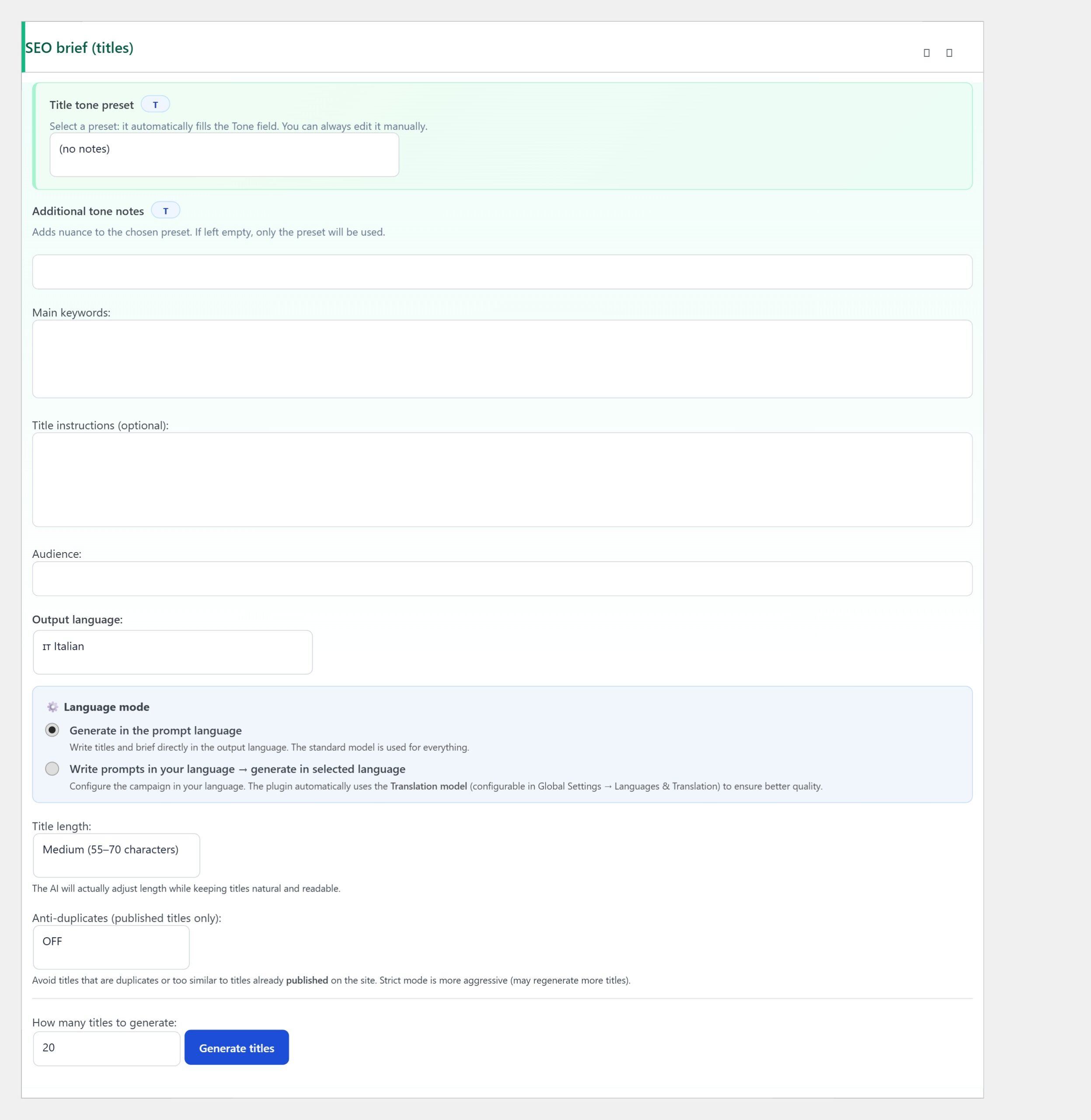
Create or edit a campaign. Scroll to the panel titled Language mode. The first field is the base output language — the language that drives the brief, the title generation and the focus keyphrase. The detected multilingual plugin is shown on the right with a confirmation badge: “WPML active” or “Polylang active”.
Step 3 — Pick the translation strategy
The Translation strategy dropdown has two options:
- Generate per language (highest quality) — the plugin runs the full generation pipeline once per language, each time with a brief written natively in the target language. Cost scales linearly with the number of languages, quality is highest. Right for SEO-oriented evergreen content.
- Translate from base — the plugin generates once in the base language, then asks the configured translation model to translate the result into each enabled language. Cost is roughly 1.3× the base cost regardless of language count, quality is good but visibly translated. Right for high-volume news content or campaigns with tight budgets.
The third option that doesn’t appear in the dropdown but you should know about: mix. If you set Generate per language for SEO meta (title, slug, description) and Translate from base for the body, you get native-quality metadata that ranks well, plus body content at lower cost. The advanced panel exposes this hybrid mode for users who outgrow the binary choice.
Step 4 — Pick the languages to publish
The languages-to-publish row shows pills for every language WPML/Polylang has configured. Click a pill to toggle that language ON or OFF for this campaign. Different campaigns can target different language subsets — a blog campaign might publish in 4 languages, a news campaign might only publish in 2.
Below the row a one-line summary explains what’s about to happen: “Each post is generated N times (once per active language). Posts are auto-linked via WPML’s translation group.” That last part matters — WPML’s translation group is the metadata that connects the four language versions of a single article. Without it, your Italian version and your English version are unrelated posts; with it, WPML knows they’re translations of each other, populates hreflang tags accordingly, and the language switcher widget on the frontend works correctly.
Step 5 — Set the translation model for fallback
If you picked “Translate from base” strategy, the Translation model panel becomes important. The default GPT-4.1 Mini is excellent for the major European languages, fast and cheap. For less common languages (Polish, Greek, Bulgarian, Romanian) consider switching to a larger model — Claude Sonnet handles these well, GPT-4o handles them excellently. The translation model only fires in Translate mode; in Generate mode it’s unused.
For Asian languages (Japanese, Korean, Chinese) the recommendation is different. The default GPT-4.1 Mini handles them but with visibly translated rhythm. Switching to Gemini or to a specifically Asian-trained model produces noticeably better output. The Translation model dropdown lets you pick per campaign so you don’t have to commit globally.
Step 6 — Verify the URL pattern
The per-language URL pattern preview shows you what the URLs will look like for each language. WPML’s default is language-prefix (/en/, /it/, /es/, etc.); Polylang supports both prefix and subdomain modes. The plugin respects whatever WPML/Polylang is configured to do; it doesn’t try to override it.
Slugs are auto-translated alongside the body. A post about “How to create a Claude API key” becomes /it/come-creare-claude-api-key/ in Italian, /es/como-crear-clave-api-claude/ in Spanish, /fr/comment-creer-cle-api-claude/ in French. AI Content Generator generates each slug natively (not transliterated) which is correct for SEO; readers and Google both prefer language-appropriate URLs.
Step 7 — Run a one-title test
Queue a single test title in the base language, click Generate. The plugin produces N drafts (one per active language) in roughly the time it takes to produce one — generations run in parallel against the AI provider when possible. Open Posts → All Posts and switch the WPML language filter to inspect each version individually.
Check the language switcher on the frontend: clicking from English should land on Italian, clicking from Italian should land on French, all four should be linked. If the switcher doesn’t show the alternative languages, the translation group wasn’t created correctly — open the post in the admin, scroll to the WPML metabox, and verify the “Translation of” field is populated. If empty, run AI Content Generator → Tools → Re-link translation groups.
Cost arithmetic for multilingual campaigns
A campaign publishing 1 post per day in 4 languages costs 4× the API budget of a single-language campaign in Generate mode, ~1.3× in Translate mode. With Claude Sonnet 4 at $0.05 per article, that’s $0.20/day or $6/month for Generate, $0.065/day or $2/month for Translate. With Gemini 2.0 Flash the numbers drop to $0.03 and $0.01 daily respectively.
For most blogs the choice is “Generate for SEO content, Translate for high-volume short-form”. The hybrid mode lets you write that logic per campaign without compromising. The savings compound: a multilingual news site publishing 15 posts/day in 4 languages in Translate mode costs $4-6/month total, versus $25-30 in pure Generate mode.
Troubleshooting common issues
- WPML active but plugin says “no multilingual plugin detected” — WPML’s REST API is disabled. Enable it under WPML → Settings → REST API.
- Translation group links the posts but hreflang tags are missing — WPML didn’t add them automatically. Check WPML → Settings → Language URL format; switching it to “different languages in directories” usually fixes it.
- Slugs are not translated, they stay in the base language — your translation model isn’t generating slugs. Either switch to “Generate per language” or upgrade the translation model from Mini to a heavier variant.
- Some languages publish, others fail silently — check the Logs for that language. Usually a rate-limit or a translation model that doesn’t support the target language. Switch to a different translation model for the failing language.
- Yoast/Rank Math SEO data is only filled on the base language — enable “Auto-generate meta SEO” with “Generate per language” instead of “Inherit from base”. Same operation, different mode.
You’re done
That’s the entire multilingual pipeline: WPML or Polylang detected automatically, pick the languages to publish, choose Generate vs Translate based on content type and budget, verify the URL pattern, run a one-title test, inspect the language switcher on the frontend.
From here you have a single campaign that publishes in every active language with one click. Adding a new language is a 30-second operation: enable it in WPML or Polylang, click its pill in the AI Content Generator campaign editor, save. Your editorial reach scales with the number of languages without scaling your editorial workload — which is exactly the property automated publishing should have.