
The single biggest reason two AI-written articles feel different from each other isn’t the model, the length or the structure — it’s the tone. AI Content Generator gives you two tone controls per campaign that together determine how every article sounds: the Title tone preset in the SEO brief (titles) panel and the Content tone preset in the SEO brief (content) panel. Set them once, save the campaign, and every article from then on respects the voice you picked.
This tutorial covers both controls end-to-end: where they live, the available presets, how they interact, the “additional tone notes” field that lets you nudge the model beyond the preset, and the recommendations for matching the right tone to the editorial intent of a campaign. By the end you’ll have a clear voice strategy for each of your campaigns and the confidence to keep tone consistent across hundreds of generated articles.
Two layers of tone control
AI Content Generator separates title tone from content tone on purpose. A blog can have punchy, attention-grabbing titles paired with calm, expert body copy — or vice versa, formal titles with friendly body. Keeping the two controls separate lets you compose those combinations without compromising either.
The title tone preset lives at the top of the SEO brief (titles) metabox, alongside main keywords, audience and output language. The content tone preset lives in the SEO brief (content) metabox, alongside article length, content preset and tone & structure controls.
Setting the title tone
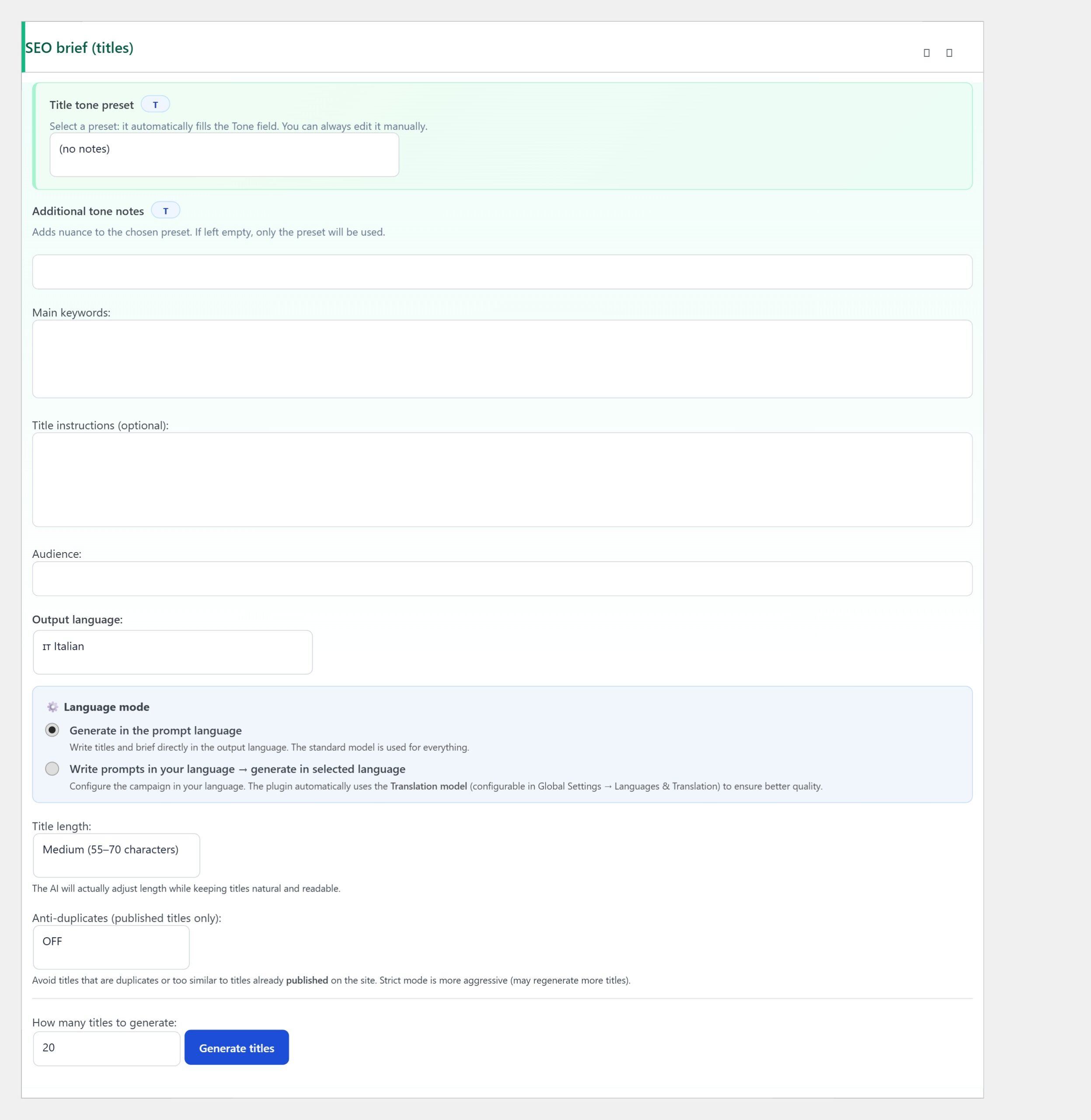
Open the SEO brief (titles) metabox. The first dropdown is the Title tone preset. Pick the option that matches your editorial voice: a “neutral professional” tone produces titles that read like quality magazine SEO; a “playful / engaging” tone produces titles that hook social-media readers; a “formal / corporate” tone produces titles that fit a B2B or institutional audience.
Below the preset there’s an Additional tone notes textarea. This is where you nudge the model. Write short, specific instructions: “Never start a title with ‘Discover'”, “Always include a year for evergreen topics (e.g. 2026 in brackets)”, “Avoid superlatives like ‘best ever'”. These notes apply on top of the preset and are honoured strictly by the model.
Setting the content tone

Scroll down inside the campaign editor to the SEO brief (content) metabox. After the article length (Min words / Max words) and the content preset (Standard balanced / Guide practical how-to / E-commerce conversion), you’ll find the Tone & structure preset section. It contains a Tone mode selector and a Content tone dropdown.
The Content tone options include Neutral professional, Authoritative / Expert, plus several other registers. The selection drives sentence length, vocabulary choice, paragraph rhythm and the implicit reader the model writes for. Neutral professional is the safe default for SEO blog content; Authoritative / Expert is right for technical deep dives where the audience expects rigour.
Mixing title and content tone deliberately
The combination of title tone and content tone is what gives each campaign its identity. A few combinations that work well in practice:
- Punchy title + expert body — title tone “engaging”, content tone “Authoritative / Expert”. Titles hook the reader, body keeps the trust. Right for SEO blogs targeting professional audiences.
- Formal title + friendly body — title tone “Formal”, content tone “Neutral professional” with additional notes “explain technical terms when they first appear”. Right for institutional sites whose audience expects formality at first sight but appreciates accessible body copy.
- Neutral title + neutral body — both set to “Neutral professional”. Right for high-volume news-style content where consistency matters more than voice differentiation.
Avoid mismatches that fight each other — a playful title paired with a formal body creates whiplash for the reader and rarely lands well. When in doubt, keep title and content tones in adjacent registers.
Tone notes vs Extra AI instructions
AI Content Generator exposes two separate fields for free-form instructions: the Additional tone notes field inside SEO brief (titles), and the Extra AI instructions (campaign) metabox lower down the campaign editor. The difference matters.
- Additional tone notes only affect titles. Use this for title-specific rules (“never start with a verb”, “always include the year”).
- Extra AI instructions affect everything. Use this for global voice rules (“use first person plural, never second person”, “explain every acronym on first use”).
Putting tone rules in the wrong field is a common gotcha. A global “never use the word ‘Discover'” rule belongs in Extra AI instructions; a title-specific “open with a benefit, not a feature” belongs in Additional tone notes.
Testing your tone setup
After you pick your presets and write the additional notes, generate a small batch — three articles is enough — and read them as a normal reader would. Two questions to ask yourself.
- If you removed the title and showed only the body, could a reader guess the title tone from the body, or would the body fit any title? If the body is too neutral to imply the title tone, the content tone preset is too generic — switch to a more distinctive option.
- Do the three articles feel like they could appear next to each other on the same blog index page? If they feel jarringly different, the tone presets are bleeding into article-specific drift — tighten the additional tone notes.
Iterate on the presets for a week. Most campaigns find their final tone configuration after 10–20 generations, and from then on it just runs.
Tone across multiple languages
If the campaign is configured for an output language different from the prompt language (the SEO brief (titles) panel exposes a language mode toggle for this), tone presets translate well across major European languages but less well across Asian languages. The “Neutral professional” register sounds the same in English, Italian, Spanish and French; in Japanese or Korean the same register reads as overly stiff because the implicit politeness levels are different.
For Asian-language campaigns, layer extra tone notes that explicitly address the politeness register expected in that language. The model handles this fluently once it’s told what to aim for; without explicit guidance it defaults to the most formal register, which often reads as cold.
Troubleshooting
- Tone feels generic despite the preset — the additional tone notes are empty. Spend ten minutes writing brand-voice instructions; one paragraph of specific notes changes the texture of every generated article.
- Titles and body don’t match the same article — title tone and content tone are mismatched. Re-align them to adjacent registers.
- The model keeps using a word you banned — the ban is in the wrong field (tone notes only affect titles; for global bans use Extra AI instructions).
- Different campaigns drift toward the same voice — your presets are too similar. Pick distinctly different presets per campaign so each cluster has its own identity.
- Tone changes mid-article in long-form content — the chunk generation pipeline applies tone per chunk; without explicit instructions the second half can drift. Reinforce in Extra AI instructions: “Keep the tone consistent from the first paragraph to the last”.
You’re done
That’s the full tone strategy: pick a title tone preset in SEO brief (titles), layer additional tone notes for title-specific rules, pick a content tone preset in SEO brief (content), use Extra AI instructions for global voice rules. Test on three articles, iterate for a week, then let the campaign run.
Once each of your campaigns has its own deliberate combination of title tone and content tone, the blog stops looking like a generic AI-written feed and starts reading like a coordinated editorial product — which is the difference between content that ranks and content that doesn’t.